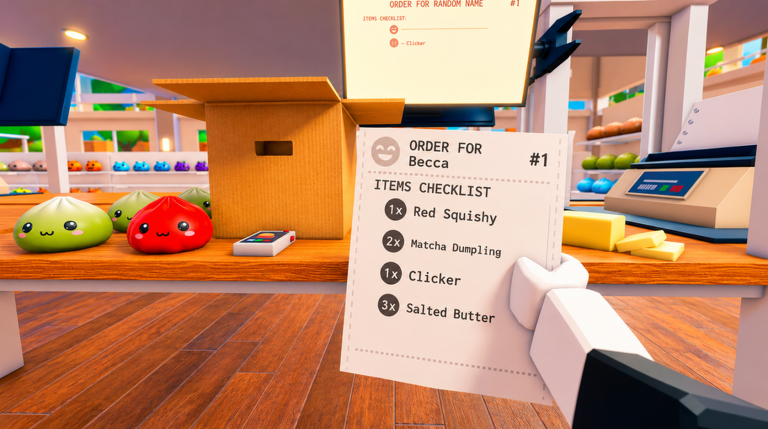
Pack an Order! is a fast-paced warehouse game where you manage customer orders, hunt for items on shelves, and pack boxes for delivery. The game rewards speed and accuracy—complete orders quickly to earn coins, unlock upgrades, and climb the leaderboards. You can play solo or team up with friends.
Here's everything you need to know to get started.
Your First Order
When you start the game, you'll see a customer order on your screen. It lists the items you need to find and pack. Your main goal is simple: locate each item in the warehouse shelves, grab it, and place it in the correct box.
- Read the order. Look at which items are requested and how many of each.
- Search the shelves. Walk around the warehouse and look for the items listed. They're placed on various shelves throughout the space.
- Pick up items. Press
E(or left-click on PC) to grab an item from the shelf. - Pack the box. Return to your packing station and press
Eagain to place the item into the order box. - Repeat. Keep collecting items until the box is full, then move to the next order.
Core Controls
You only need a few button presses to pack orders efficiently:
- Pick up / Pack items: Press
Eor left-click - Drop item: Press
Q - Inspect item: Right-click or press
Y(useful for checking exactly what you're holding) - Cycle through your carried items: Scroll your mouse wheel
- Switch between orders: Press
R
The Packing Workflow
Every order follows the same pattern. Understand it, and you'll pack faster:
Step 1: Look at the order. A new order appears with a list of items. Pay attention to the exact names and quantities.
Step 2: Hunt for items. Leave your packing station and search the warehouse shelves. Items can be hidden anywhere, so explore thoroughly.
Step 3: Grab what you find. Pick up items as you see them. You can carry more than one item, so collect multiple things in a single trip if possible.
Step 4: Return and pack. Go back to your station and carefully pack each item into the box. Match the order requirements exactly.
Step 5: Load the truck. Once the box is complete, load it onto the delivery truck waiting outside the warehouse.
Step 6: Start the next order. The cycle repeats. New orders appear as soon as you load a truck, and the timer never stops.
Beating the Clock
Pack an Order! is all about speed. You're racing against time to complete as many orders as possible.
Why speed matters: Faster completion times earn you more coins and unlock spots on the leaderboards. The game rewards efficiency—players who finish orders in seconds rather than minutes climb fastest.
How to go faster:
- Learn the warehouse layout so you know where items usually spawn.
- Carry multiple items at once using the scroll wheel.
- Minimize walking time. Grab items on the way back from your last trip.
- Work together with teammates. Divide orders so you're not duplicating effort.
Coins and Upgrades
As you complete orders, you earn coins. Spend these to unlock three main upgrades:
- Speed: Move faster around the warehouse.
- Reach: Grab items from shelves more easily, even those that are harder to access.
- Carry Capacity: Hold more items at the same time.
Upgrades make future orders easier and faster. Prioritize the upgrades that fit your playstyle—if you like collecting lots of items per trip, boost Carry Capacity first. If you prefer moving quickly between locations, choose Speed.
Solo vs. Multiplayer
You can tackle Pack an Order! alone or with friends. Here's what changes:
Playing solo: You handle everything—all the searching, packing, and loading. It's harder and slower, but you set your own pace.
Playing with teammates: Divide the work. One player can search for items while another packs. Someone else can load trucks. Working together gets orders done much faster, and you rack up coins quicker for upgrades.
If you're playing with others, communicate. Tell your team which items you're looking for and who's packing which order.
Early Goals and Tips
First session goals:
- Complete 5 orders without mistakes.
- Learn where items spawn on the main shelves.
- Save up coins and buy your first Speed or Carry Capacity upgrade.
- Try playing with a friend to see how much faster teamwork makes you.
Beginner mistakes to avoid:
- Packing the wrong item: Double-check before you pack. Inspect items if you're unsure.
- Wasting time on single items: If you can't find something quickly, move on and grab other items first. You'll circle back.
- Ignoring upgrades: Don't hoard coins. Spend them on upgrades—they make you much more efficient.
- Going solo too long: Bring a friend once you understand the basics. You'll progress faster and have more fun.
R to cycle between orders if you have multiple active. This helps you focus on one at a time without losing track of what you need.Leaderboards
The fastest warehouse crews appear on the leaderboards. Your completion times are tracked, so every second counts. To climb the rankings, focus on three things:
- Master the warehouse layout so you never waste time searching.
- Upgrade your Speed and Carry Capacity to work more efficiently.
- Team up with skilled players who understand the workflow.
Start competing once you're comfortable with the basics. Early on, just focus on completing orders accurately and understanding how the game flows.