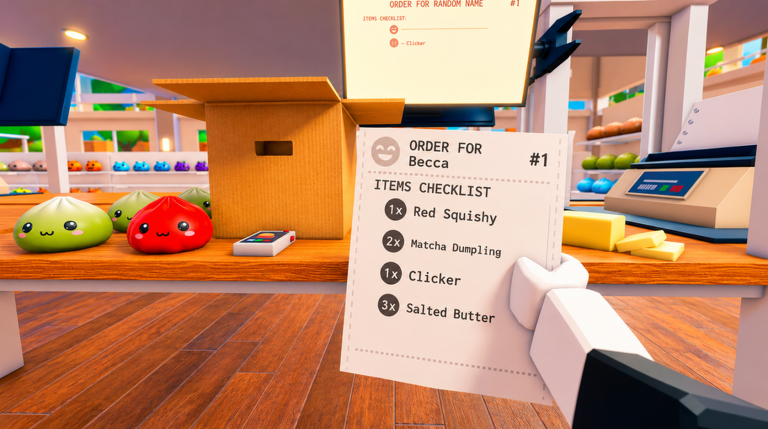
Pack an Order! drops you into a busy warehouse where customer orders keep rolling in. Your job is to hunt down items on shelves, pack them into the right boxes, and ship them out. Speed earns you coins and leaderboard points, so let's get you packing efficiently from the start.
Master the Controls
Get comfortable with your PC controls right away. Press E or Left Click to pick up and pack items. Q drops what you're holding. Use R to cycle through customer orders so you can see what's next. Scroll Wheel lets you switch between items you're carrying, and Right Click or Y inspects an item to see its details. These buttons are your lifeline—muscle memory saves precious seconds.
Read Orders Before You Run
Each customer order asks for specific toys. Don't just grab random items and hope they match. Pause for a second, use R to check the current order, and memorize what you need. Packing the wrong item wastes time unpacking and repacking. Know the target before you sprint to the shelves.
Use Scroll Wheel for Quick Swaps
Since you can carry multiple items at once, hold one of each toy you need for an order. Use your Scroll Wheel to cycle between them instead of dropping and picking up the same items over and over. This keeps your flow smooth and saves trips back to shelves.
Prioritize Speed Upgrades Early
Your coins unlock upgrades for Speed, Reach, and Carry Capacity. Buy Speed upgrades first—moving faster lets you complete more orders in the same time window, which earns more coins and opens the leaderboard race. The faster you pack, the faster you earn the currency for other upgrades.
Reach Upgrades Save Steps
Reach increases how far you can grab items from shelves without walking right up to them. This cuts down travel time in a packed warehouse. Once you've boosted Speed a few times, invest in Reach to reduce wasted movement.
Carry Capacity Is Efficiency
Higher Carry Capacity lets you hold more items at once. This is powerful because you make fewer trips to shelves and pack faster. After Speed and Reach are solid, bump up Carry Capacity to move even bigger orders in one run.
Unlock Abilities When You Can
The game mentions unlockable abilities that make packing faster. These cost coins, but they're worth chasing once your basic upgrades are flowing. Check what abilities are available and plan your coin spending around the ones that fit your playstyle.
Watch the Timer
Orders have a time limit. Don't dawdle on shelves. If you're down to your last few seconds, grab what you can and pack it fast rather than searching for a perfect item. A finished order—even if scrambled together—beats a timeout.
Farm Coins on Easy Orders
Early orders are simple and quick to complete. Blast through them to stack coins fast. This lets you buy upgrades sooner and tackle harder orders later when you're stronger.
Climb the Leaderboards
The leaderboard ranks players by fastest completion times. Speed upgrades and ability unlocks are your main tools for climbing. Focus on shaving seconds off each order—small improvements add up to big jumps in rank.
Play Solo or Multiplayer
You can run orders alone or team up with friends. Multiplayer is chaos in the best way—more hands means faster packing and better chances to beat the clock. Experiment with both to see which helps your coin flow and ranking.